Telewell tw-eav510
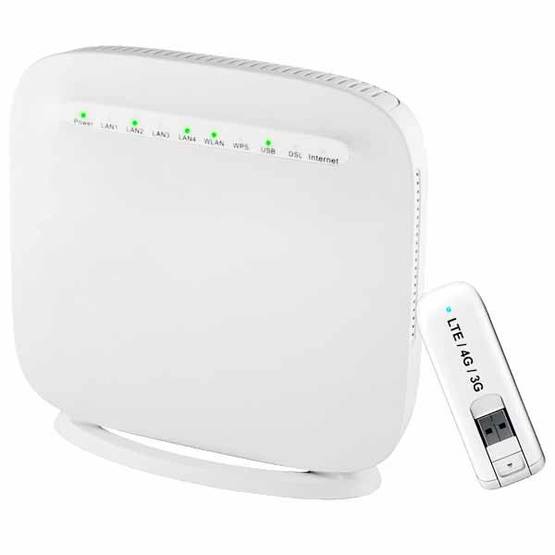 As I have been explaining in some of the other articles, I have a challenging in the area where I live, to get fast internet access via cable. ADSL is not sufficient speed, especially the upload speed is too slow, as I am also running a website and other services I want and need to access from outside my LAN area. However, as 4G networks are expending and seeps are actually very decent for the price, I have been looking for a proper 4G router to give access. It has been quite a journey, but I found in the Telewell a very good solution, frankly the best on the market I have found so far.
At the time I bought the other routers, I was also experimenting setting up my own webserver hosting an internet site. I could not figure out why I CAN reach my server with the url from within my LAN when I use my ADSL to get internet access, but CANNOT when I use the wireless router to access internet. It took me many, many nghts and gray hair to research this. But then the day came that I found out about “NAT Loopback“… You can imagine my disappointment having bought 2 very expensive mobile routers from renowned brands that they did not support. I thought, “it can’t be that there isn’t any brand supporting this..” And doing a lot of research, I found Telewell and I couldn’t believe that on all their products this is a standard feature… and it was cheap!! less then 100€, half teh price of the well-known brands… Wow!
So, I bought the device, straight from their website. Opened the box, plugged it in, connected everything, and….. all lights were on, opened my browser to query a website… BOOM, link down… Whatever I did, same results. I was SOOO pissed and was ready to dump also this device in the trash. I checked there website looking for support contacts.. None! .. GRRRR. Then an angry mail to the sales department to ask my money back. I was so surprises on the responds I got. I get directly connected to their engineering department. They really took their time to help me. Several mails explaining detailed the problem, with screenshots. Then they offered to take remote connection to my device, took log files, and it all didn’t work at first. some days later the they figured out the problem. They also logged and deep-dived with my provide on the Mobile network. Surely they spend countless hours researching my problem. It turned out that I am living in kind of Bermuda-triangle of the telecom network, right in a special spot between high-speed trial networks and a normal network, which is sightly different then usual. (so I have been told) Together with adjustment by the operator, and special config settings on my modem, the problem was solved. Have you ever had such customer service from any your “less-than-100€- products” you have bought? Well, I haven’t! Telewell, this is supper!
As mentioned, before I bought this router, I first tried a couple of other mobile routers (D-link and Huawei). The performance was reasonable. Speed remained significant lower then my operator promised, and also network disruption happened a lot, but no surprise. UNTILL I actually started to use the Telewell router. Without changing the operator, I had instantaneously significant higher effective speed (measured with speedtest.net). The other immediate recognizable benefit was the fact that weeks and weeks went by without any network disruption. I have some devices on my network which report if Internet gets disconnected. With the other routers it happened daily, with this Telewell, hardly ever.
So, Telewell: very good value for money, good performance, great features, and excellent customer service!
Pro’s:
- It is very cheap! At the time I bought this, the router and the 4G modem stick together was less then 100€, compared to most other mobile routers being 200€+
- It has the NAT loopback (or hair pin) feature, that nearly no other manufacturer has put in their mobile routers. It is a common feature on fixed routers or modems, but not in Mobile routers.
- Unbelievable good support!
Con’s:
- 4G modem has decent reception, but it is a stick, without optimal antenna, so you need to put it somewhere you get optimal reception. You can optionally get an external antenna, but that generates even more wires and clutter. (I am still considering that, though!)
- The USB model is connected with a 90-degree angle sticking from the back or connected with a USB cable, dangling wherever you put your router. Considering, that you cannot just put it in a back-closet, hidden from public eye, it will not look nice and take unnecessary space where you put it. (Remember it is a 4G modem and needs to be placed in good reception area)
- User interface is not state of the art. perhaps doesn’t matter, as most novice users would not start configuring the device yourself, so the “techies” among us will manage fine.
- User guide is also not really written with the average consumer in mind, and more written by and for an engineer.
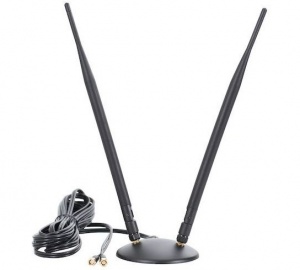
Update (September 2017): I have been noticing that my internet speed has been very much fluctuating. Usually the download speed has been more or less decent, but upload speed was quite often down to nearly zero mbit/s. I knew already that this is very much due to the fact that the 4G-USB modem stick does not have any proper antenna. I have been planning that I should buy an external antenna, but Never really came around doing so. Mainly, if you take an outdoor antenna, its quite a hassle to drill holes through your wall and need to be sure you have a good location to put the router. For an indoor antenna, you have another device on your desk or shall or where you put it, it is surely in your way…
Anyway, I got really feed-up with with the instability, so I did some internet searching and found very interesting YouTube videos explaining this phenomenon. I learned, unlike any other wireless technology, 4G/LTE requires you to have 2 separate antenna’s to get the performance out of your device. e.g. watch this YouTube video. Thai convinced me to buy one indoors antenna. Probably it really doesn’t matter too much what antenna you buy, as long as it is a MIMO antenna (Multi Input Multi Output). This made a HUGE difference for me, and I literally gt speeds 10x higher! The one I bought, proscan diablo, is mainly targeting for residential areas where you are not far away from your operator’s Antenna tower. For more rural locations, other antenna’s are available, but I bet with same kind of performance improvements.